When to use this letter
Use this notice when your client owns the copyright in a work and finds it posted online without permission. Typical cases:
- Photos or artwork copied onto another website, online store or social media account.
- Written content, such as articles, course materials or product descriptions, copied word for word.
- Videos or music uploaded to a hosting platform without a license.
- Software or digital products offered for download on an unauthorized site.
- A former licensee still displaying the work after the license ended.
This notice often has a legally required form, content and notice period. The required elements come mainly from federal law, related rules can vary by state, and many services have their own designated agents and submission rules. Check them before sending. A notice with knowingly false statements can create liability.
What to upload
Upload up to 5 PDFs, 500 pages in total. Proof of ownership and dated evidence of each copy matter most.
- Proof of ownership
- The copyright registration, if any, or drafts, original files or contracts showing who created and owns the work.
- The original work
- The work itself, or a sample, saved as PDF, with the date it was created or published.
- Screenshots of each copy
- Dated screenshots showing the infringing material and the full URL in the address bar.
- License records
- Any license, permission or terminated agreement with the person who posted the material.
- The service's agent details
- The host's or platform's designated agent page or copyright policy, saved as PDF.
What the draft includes
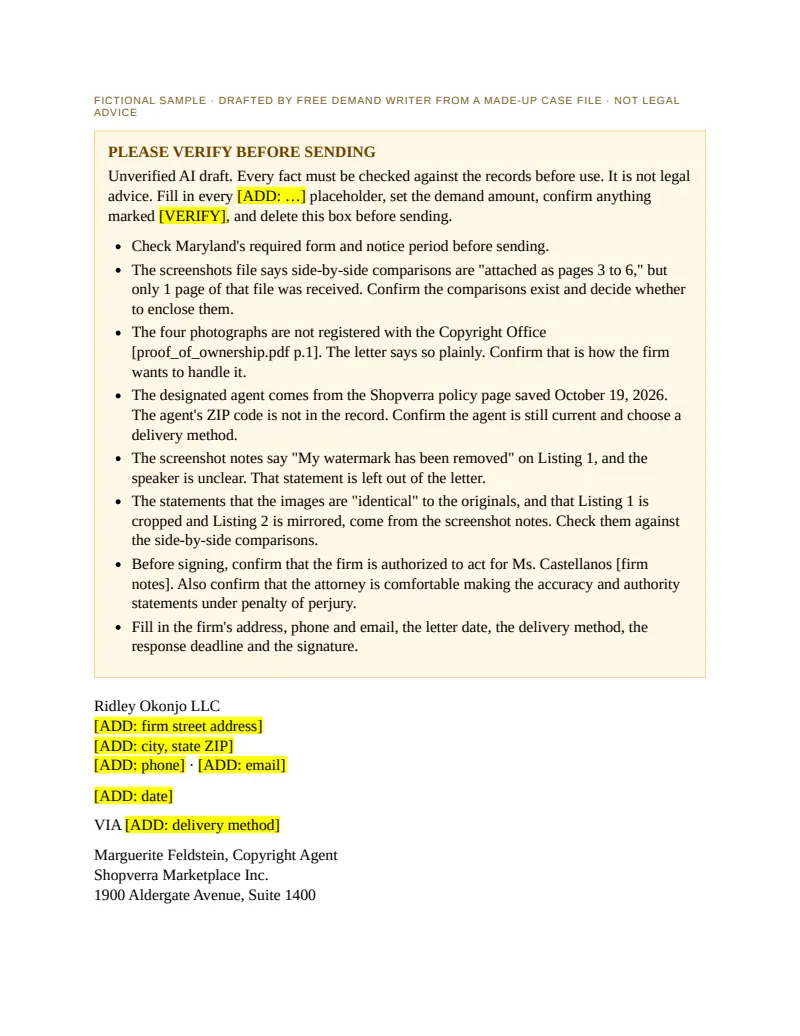
An editable Word letter built only from what your documents say. Missing facts become [ADD: …] placeholders, never guesses, and any law cited is marked [VERIFY].
- Please verify box. A short notice at the top reminding the reviewer that this is an unverified AI draft, with the required elements flagged.
- The copyrighted work. Title, author, date and any registration, exactly as in the documents.
- The infringing material. One entry per URL or listing, cited to the screenshot it comes from.
- Contact information. The firm's address, phone and email, from the firm details or as placeholders.
- Good-faith statement. A statement that the use is not authorized by the owner, its agent or the law.
- Accuracy and authority statement. A statement that the notice is accurate and, under penalty of perjury, that the sender is authorized to act for the owner.
- Signature line. A placeholder for a physical or electronic signature.
Before you send it
The result is an unverified AI draft for attorney review, not legal advice.
- Confirm every required element is present and correctly worded.
- Check each URL against a fresh visit before sending.
- Consider fair use and any license before signing the statements.
- Confirm the service's designated agent and submission method.
- Remove the Please verify box and sign the notice.
Common mistakes
Services process takedown notices quickly and reject incomplete ones. These are the errors most worth fixing.
- Missing a required element A notice without the good-faith statement, the accuracy and authority statement or a signature may be rejected. Check each one.
- Vague locations Pointing to a whole site rather than each URL makes the service's job harder and can make the notice incomplete. List every location.
- Ignoring fair use and licenses Signing a notice without considering fair use or an existing license can lead to a counter notice or a claim against your client.
- Sending to the wrong address Many services designate a specific agent or web form for notices. A letter to a general inbox may not count.
- Mixing in other demands Money demands and threats belong in a separate letter to the infringer, not in the notice to the host.
Free dmca takedown demand letter template
Prefer to write it yourself? Download a plain Word template with fields to fill in. No AI, no email needed. Sample template, not legal advice.
Questions
Is the DMCA takedown demand letter free?
Yes. No account and no payment.
Does my client need a copyright registration?
A takedown notice does not usually require one, but a registration helps prove ownership. Upload it if your client has one, and confirm the rules for any next step.
Can it send the notice to the platform?
No. It drafts the notice in Word. You confirm the designated agent and send it yourself.
Can I list many URLs in one notice?
Yes. Upload screenshots of each copy and the draft lists every location it finds, cited to the page.
What happens to the documents I upload?
They are deleted as soon as the draft is generated. The Word file is deleted after 48 hours or 3 downloads.